Authentication
Authenticate with TANGO
The TANGO platform implements a robust authentication and access management system through the TANGO Auth API, designed to manage user sessions, tokens, grants and workspace access. This system ensures secure, role-based access to the platform's resources, providing flexibility for users who belong to multiple workspaces. While the API provides the technical means for access management, the platform’s dashboard offers a more user-friendly interface for managing workspaces, grants and tokens.
Only some features are available in the dashboard, while the API provides a more comprehensive way of interacting with the Platform.
At the moment of writing this documentation, the TANGO Auth API server to make the requests is hosted at this link.
Authentication
Obtain Access Token
To authenticate with the TANGO platform, you need to obtain an access token. This token is used to authorize your requests to the TANGO APIs.
An access token to the TANGO platform can be obtained by logging in with your email and password inside a specific workspace.
To obtain an access token, if you already have access to the TANGO platform, you can make the following request:
POST /api/auth/token/obtain
{
    "email": "{{user_email}}",
    "password": "{{user_password}}",
    "workspace": "{{workspace_name}}"
}
- More details about workspaces can be found in the Workspaces section.
Obtain Access Token without a Workspace
If you do not know the workspaces you belong to, you can first access without specifying a workspace:
POST /api/auth/token/obtain
{
    "email": "{{user_email}}",
    "password": "{{user_password}}"
}
And then fetch the list workspaces you have access to:
GET /api/auth/workspace
- Requires bearer token authentication:
Authorization: Bearer {{access_token}}
After obtaining the list of workspaces, you need to authenticate again with the desired workspace in order to use the TANGO Platform APIs as shown in the previous section.
Access Token and Refresh Token
When you successfully authenticate, you will receive an access token and a refresh token.
The access token is the one you need to include in the Authorization: Bearer {{access_token}} header of your API requests.
The refresh token is instead used to obtain a new access token when the current one expires through the /api/auth/token/refresh endpoint.
Or, in alternative, you can authenticate again with the /api/auth/token/obtain endpoint.
Verify Access Token
To verify the validity of your access token, you can use the following endpoint:
GET /api/auth/token/verify
- Requires bearer token authentication:
Authorization: Bearer {{access_token}}
And it returns a Json Web Token (JWT) like this:
{
    "valid": true,
    "token_data": {
        "token_type": "access",
        "exp": 1749717957,
        "iat": 1749717657,
        "jti": "92e5b6c9cfc84b94875516451c786852",
        "user_id": 4,
        "permissions": ".....",
        "workspace": "default_workspace"
    }
}
NOTE: The
permissionsfield contains the permissions granted to the user in the specified workspace. These permissions determine what actions the user can perform within that workspace.
Registration
The TANGO platform does not allow for self-registration.
To be registered on the platform, you need to be invited by an existing user or administrator to a workspace.
After being invited, you will receive an email with a link to complete your registration.
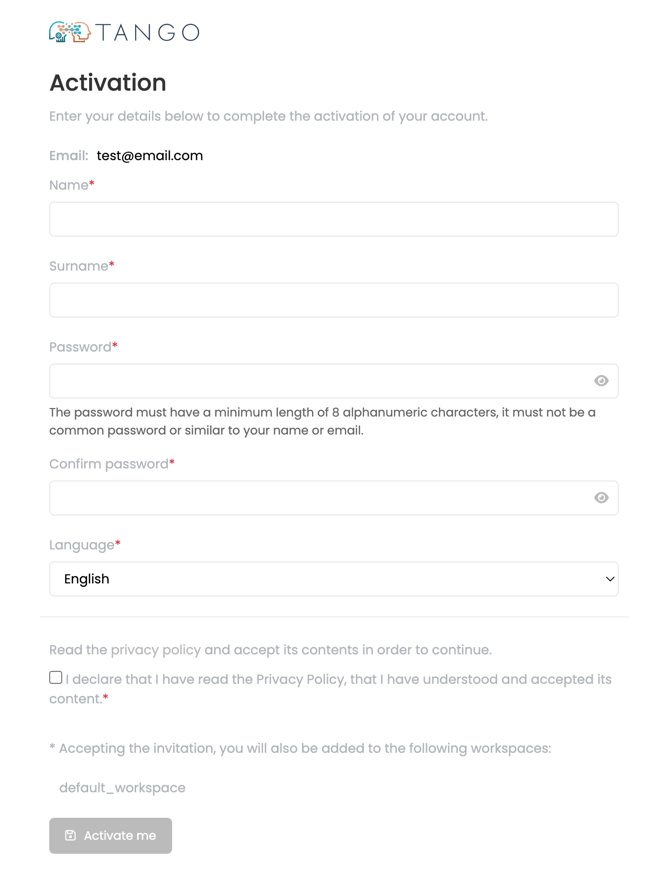
- The form requires you to enter your name, surname and password, as well as selecting your preferred language among the available options.
- You must also accept the terms of service and privacy policy of the TANGO platform.
- In the last portion of the page, you will also see the list of workspaces you have been invited to join.
Upon successful registration, you will be able to log in and obtain an access token as described in the Obtain Access Token without a Workspace section.
If you are already registered on the TANGO platform but you have been invited to join a new workspace, the email you receive is a simpler version. You will not need to fill in the registration form again, but only to accept the invitation to join the new workspace.
Workspaces
Workspaces in the TANGO platform represent isolated environments that enable multi-tenancy. Each workspace acts as a separate domain, grouping users, models and resources according to their field of application.
- Authentication is workspace-scoped: To access the TANGO APIs, you must authenticate within a specific workspace. Your access token is valid only for the workspace you logged into.
- Model assignment: Each invokable model is assigned to a particular workspace. You can only invoke models that belong to the workspace you are authenticated in.
- Separation of resources: Workspaces ensure that models, data and permissions are kept separate between different domains or organizations, supporting secure and organized access management.
- Discovering workspaces: If you do not know which workspaces you belong to, you can authenticate without specifying a workspace and then list your available workspaces using the
/api/auth/workspaceendpoint (see Obtain Access Token without a Workspace).
This design allows organizations models and users independently to be managed independently, while users with access to multiple workspaces can switch between them as needed.
Service Principal (Machine-to-Machine)
For automated services and integrations that need to access TANGO APIs without a human user session, the platform supports OAuth2 Client Credentials authentication.
Instead of an email and password, a service principal uses a client ID and client secret to obtain a JWT access token:
POST /o/token/
Content-Type: application/x-www-form-urlencoded

grant_type=client_credentials&client_id=<your_client_id>&client_secret=<your_client_secret>&workspace=<your_workspace>
The returned access_token is used in exactly the same way as a user token:
Authorization: Bearer <access_token>
To set up a service principal, register an OAuth2 application in the TANGO dashboard. See the Service Principal page for full details on setup, token rotation, and security considerations.